Bubble Chart Pro bubble charts are highly customizable with over 60 different parameters that you can control to get just the look you want, including colors, backgrounds, font sizes and styles – the possibilities are endless. Of course, you can save a default set so all your charts open with your favorite settings.
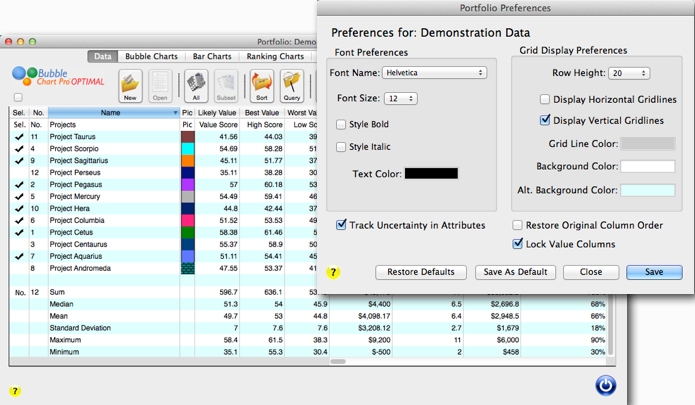
In version 6, we extend that kind of customization to your portfolio and dashboard forms, so that you can get the look you want for them, too. With new preference forms, you can set different parameters such as font type, size, color, and style, row heights, gridline displays, and more.
In project portfolio forms, you’ll also be able to easily rearrange column order by dragging and dropping columns. In the illustration below, column “C” is dragged to the left to switch places with column “B.” Plus, you can restore the original column order by checking the “Restore Original Column Order” check box in the preferences form. Otherwise, the column order you select is persistent, and remains the same each time you open the form.
The new capability to track and illustrate uncertainty and risk in your project portfolio adds two new columns to the project portfolio form: “Best Value” and “Worst Value.” These two scores represent the best and worst value scores as calculated by the SMART prioritizer. The display of these two columns can be toggled on-and-off by a button in the portfolio form button bar. Furthermore, you can turn off risk and uncertainty tracking in your portfolio altogether by un-checking the “Track Uncertainty in Attributes” check box in the preferences form. This way only a single value score is calculated for each project by the SMART prioritizer, just as in earlier versions of Bubble Chart Pro.
I expect we’ll be releasing Version 6 in the next few weeks, so anyone who purchases a Version 5 license today will be eligible for a free upgrade to Version 6. Note that some of the new features will only be available in the Bubble Chart Pro PLUS and Bubble Chart Pro OPTIMAL editions.
Click here to download your free trial today!